Taxonomy vs. Navigation: What's the Difference, and Why It Matters
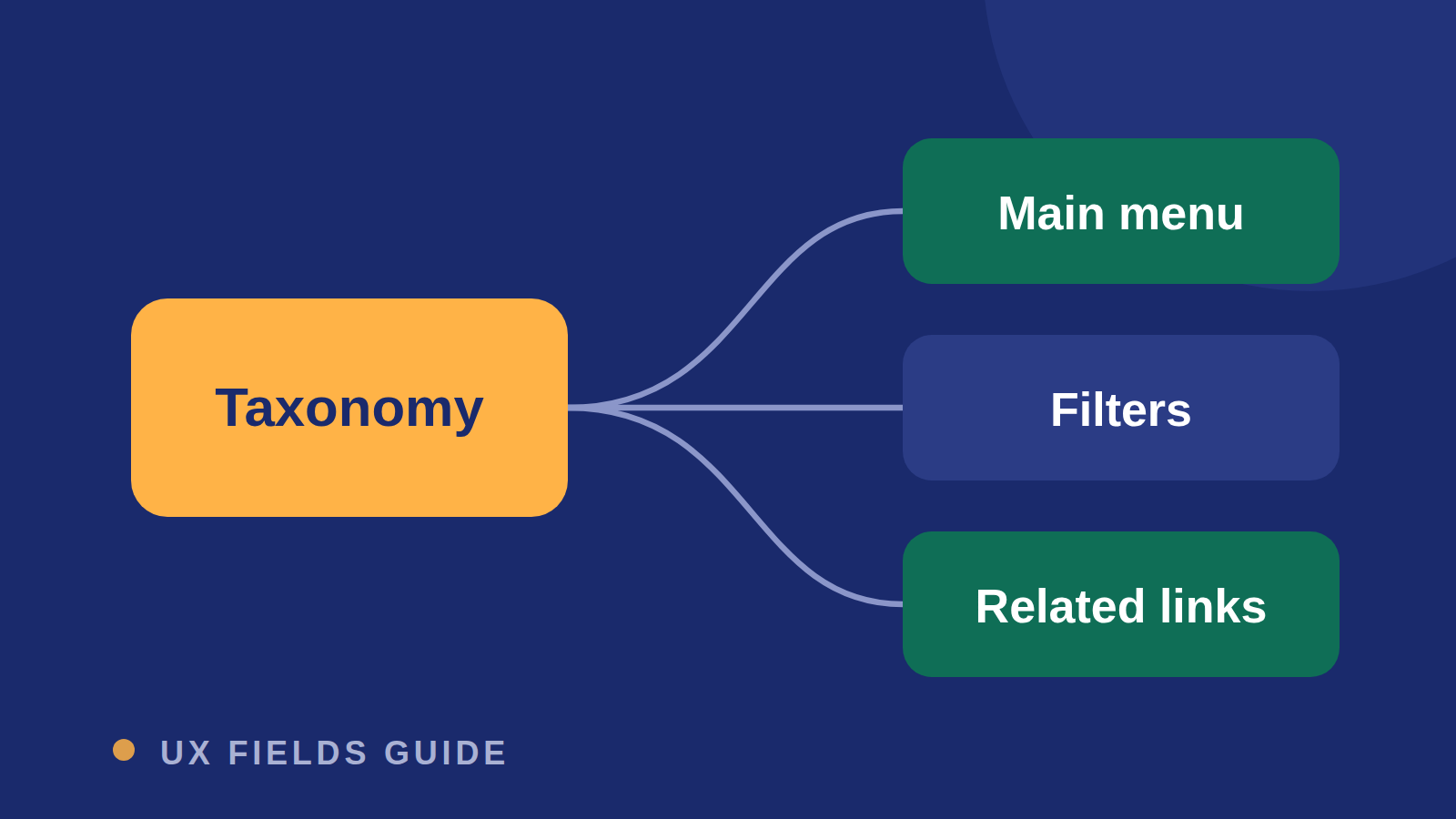
Diagram showing one taxonomy box connected to three navigation views: a main menu, filters, and related links.
Ask a team to "fix the navigation" and you'll usually get a redesigned menu. New labels, a mega menu, maybe a hamburger icon. Six months later, people still can't find things.
That's because many navigation problems aren't navigation problems at all. They're taxonomy problems. The two are closely related, but they do different jobs, and mixing them up is one of the most common mistakes in information architecture.
What is a taxonomy?
A taxonomy is the system you use to classify and label content. It answers the question: what is this, and how does it relate to everything else?
A taxonomy defines:
Categories and subcategories, such as Products → Cameras → Action Cameras
The terms you use, including which word is the preferred one ("sign" vs. "e-sign" vs. "signature")
Relationships between terms, such as parent-child, related-to, or "also known as"
Attributes, or facets, such as price, size, format, or skill level
Most people never see a taxonomy directly. It lives behind the scenes in your content management system, your product catalog, your tags, and your search filters. But it shapes almost every way people find content.
What is navigation?
Navigation is the set of interface elements people use to move through a site or app. It answers the question: where can I go from here?
Navigation includes:
Global navigation: the main menu that appears everywhere
Local navigation: menus within a section
Contextual navigation: related links inside content
Utility navigation: account, cart, help, and settings
Breadcrumbs, filters, and search, which often expose the taxonomy directly
Navigation is what people see and click. It's a view of your structure, designed for a specific audience and purpose.
The key difference
Here's the simplest way to think about it:
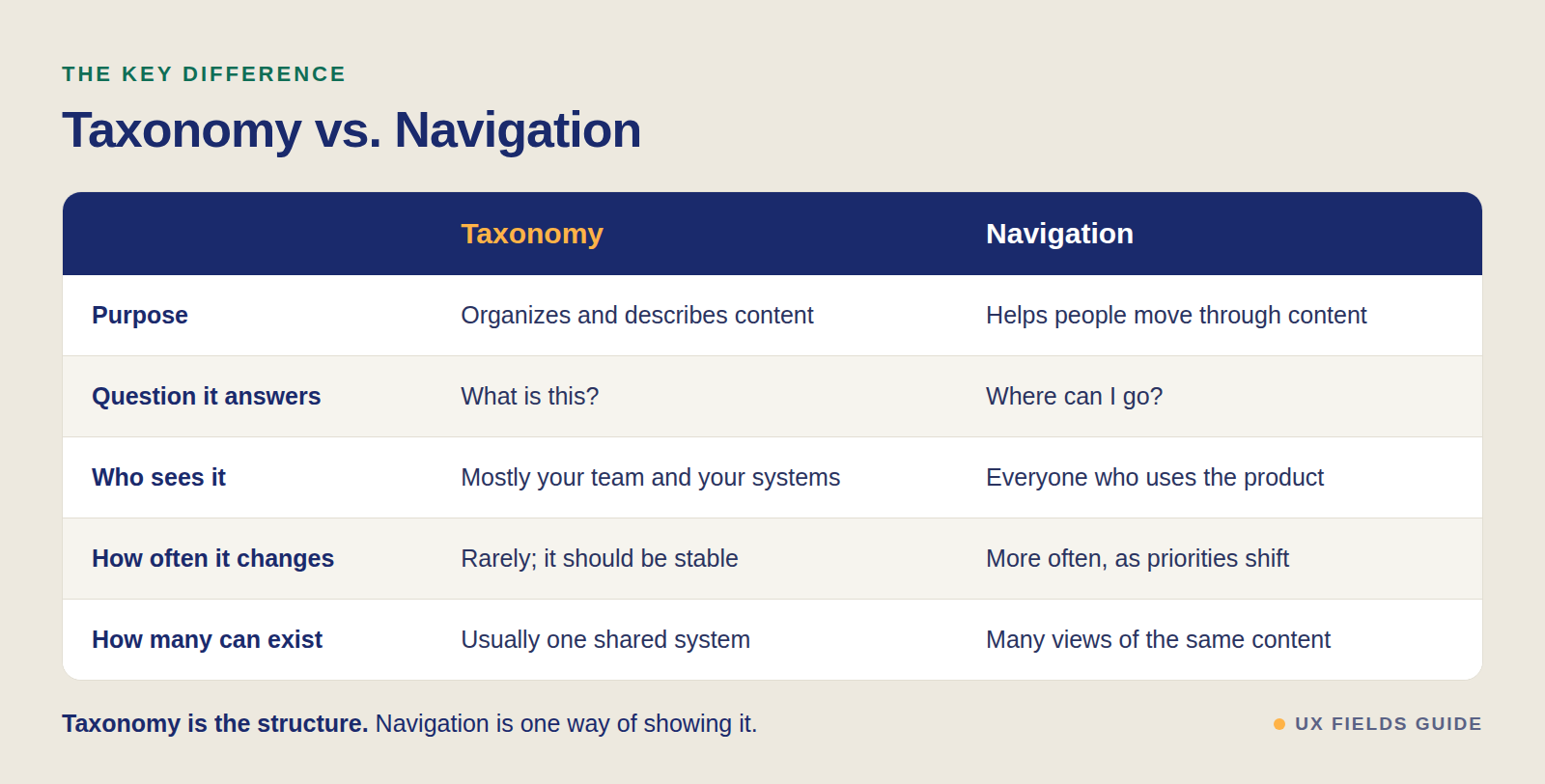
Table comparing taxonomy and navigation. Taxonomy organizes and describes content, answers "what is this," is seen mostly by your team and systems, changes rarely, and is usually one shared system. Navigation helps people move through content, answers "where can I go," is seen by everyone using the product, changes more often, and can exist as many views of the same content.
A taxonomy is the structure. Navigation is one way of showing that structure.
A single taxonomy can power many kinds of navigation. An online store might classify every product by category, brand, and use case. The main menu shows categories. A "Shop by brand" page shows brands. Search filters show all three. Same taxonomy, three navigation experiences.
Why the difference matters
1. You can't fix a taxonomy problem with a menu redesign
If your content is labeled inconsistently or grouped in ways that don't match how people think, a new menu just gives those problems a new layout. Signs of an underlying taxonomy problem include:
The same kind of content lives in several places
Teams argue about where new content should go
Search filters return strange or incomplete results
Nobody can explain why a category exists
When you see these, start with the taxonomy.
2. Navigation should be designed for people, while taxonomy is designed for consistency
Your taxonomy can use precise, internal terms, as long as they're applied consistently. Your navigation needs the words your users actually use. It's normal for a menu label to differ from the taxonomy term behind it. "Get Started" in the menu might map to a taxonomy category called "Onboarding Resources."
3. One structure, many paths
Different people look for the same content in different ways. One person browses by topic, another by task, another by role. A good taxonomy with well-defined facets lets you build several navigation paths without duplicating or reorganizing content each time.
4. Stable taxonomies scale
Menus change with marketing campaigns, product launches, and redesigns. If your navigation is your structure, every redesign means reorganizing everything. When the taxonomy stands on its own, you can redesign navigation freely while the underlying organization stays intact.
A quick example
Imagine a recipe site.
The taxonomy classifies each recipe by:
Course: breakfast, lunch, dinner, dessert
Cuisine: Mexican, Italian, Thai
Diet: vegetarian, vegan, gluten-free
Time: under 30 minutes, 30 to 60 minutes, over an hour
The navigation might offer:
A main menu organized by course
A "Quick Weeknight Dinners" page (course = dinner, time = under 30 minutes)
Filters on search results for cuisine and diet
"More vegetarian recipes" links at the bottom of each recipe
None of those navigation features requires reorganizing a single recipe. They all come from the same taxonomy.
How to work on each
To improve a taxonomy:
Run a content inventory to see what you actually have
Use open card sorting to learn how people naturally group and name things
Define preferred terms and synonyms
Write down rules for where new content goes, so the system stays consistent
To improve navigation:
Identify your users' top tasks
Use tree testing to check whether people can find things in your proposed structure
Test labels with real users
Review analytics and search logs to see where people get stuck
The best results come from working on both, in that order: get the structure right, then design the ways people move through it.
The takeaway
When people can't find what they need, it's tempting to reach for the menu. Before you do, ask: is the content organized and labeled well underneath? If the answer is no, a new navigation design won't help for long.
Taxonomy decides what things are. Navigation decides how people get to them. Get the first right, and the second becomes much easier.
New to information architecture? Start with Chapter 1: What Is Information Architecture?, free to read. For the full framework, including how to build structures that scale, see Think Like An Information Architect.
KEEP THE CONVERSATION GOING
Have you worked on a "navigation redesign" that was really a taxonomy problem? What gave it away?
Share your answer with designers from every UX discipline in the UX Fields Guide community.
Join the discussion Get the full field guide